---
title: "Customizing Venues and Organizers"
source: "https://docs.nexcess.com/software/the-events-calendar/customize-venues-organizers/"
description: "Venues and organizers let you record the places where your events happen and the people or groups putting them on. You may want to adjust how they're structured…"
vertical: "Software"
area: "The Events Calendar"
date: "2025-10-29"
last_modified: "2026-07-02"
---
# Customizing Venues and Organizers
Venues and organizers let you record the places where your events happen and the people or groups putting them on. You may want to adjust how they’re structured, displayed, or managed across your calendar. This article collects customizations for venues and organizers.
## Change the Default Venue Slug
By default, single venue page URLs use the `/venue` slug — for example, `yourdomain.com/venue/the-city-hall/`. To change this base to something else like `/location` or `/space`, use the `tribe_events_register_venue_type_args` filter, which modifies the arguments used when registering the Venues post type.
```
add_filter( 'tribe_events_register_venue_type_args', function( $args ) {
$args['rewrite']['slug'] = 'location'; // Change 'location' to your preferred slug
return $args;
} );
```
Replace `location` with your preferred slug (e.g., `space`, `place`, or `site`).
⚠️ **Flush permalinks after adding this snippet.** Whenever you change a rewrite rule, WordPress needs to regenerate its internal URL structure. Go to **Settings → Permalinks** and click **Save Changes** (you don’t need to change anything). If you skip this step, your venue pages will return 404 errors.
After flushing, your venue URLs will use the custom slug — for example, `yourdomain.com/location/the-city-hall/`.
## Change the Meta Title for Venue Pages
By default, the meta title for venue pages is the venue’s name. For SEO purposes, you may want to override this with custom text.
```
add_filter( 'document_title_parts', function ( $parts ) {
if ( function_exists( 'tribe_context' ) && tribe_context()->get( 'view_request' ) === 'venue' ) {
$parts['title'] = 'Notredame';
}
return $parts;
} );
```
Replace `Notredame` with the meta title you want to use. The same approach works for organizer pages and other metadata by adjusting the context check.
## Change the Venue Address Structure
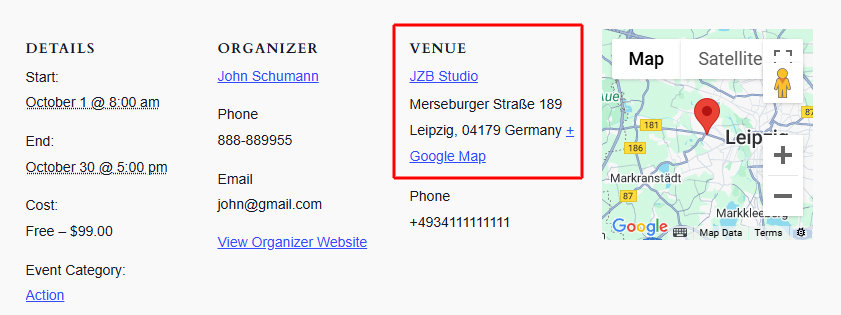
Venue addresses follow a fixed structure across the calendar:
- **Single event page (classic and block editor) and venue page (Pro):** Venue name → Street address → City, Province/State Zip Country
- **List view (longer layout):** **Venue name** Street address, City, Province/State
- **List view and Photo view (compact):** **Venue name** Street address, City
Some languages format addresses differently. To change the structure, use a template override on the address module.
The source file to copy is:
```
/wp-content/plugins/the-events-calendar/src/views/modules/address.php
```
Place your override at:
```
/wp-content/themes/[your-child-theme]/tribe-events/modules/address.php
```
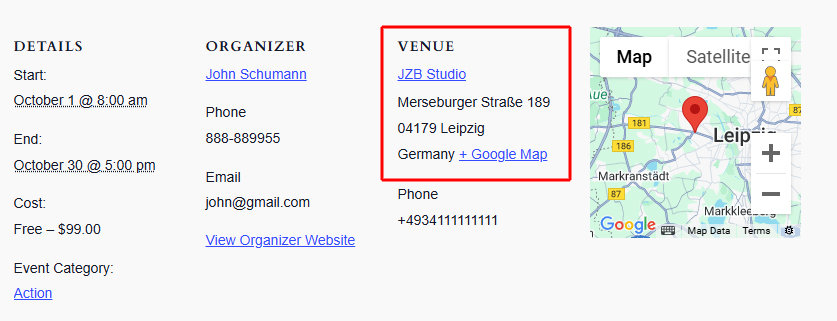
The example below reformats the address for German conventions, which produces:
**Venue name**
Street with number
Zip City
Country
```
,
,
```
Result:
## Display the Organizer Website URL Directly
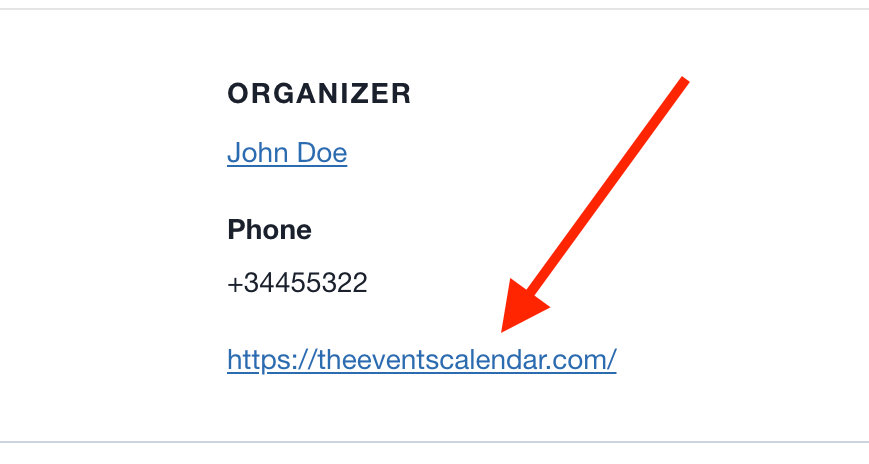
By default, the organizer’s website link displays the text “View Organizer Website” rather than the actual URL. To show the URL instead, use the `tribe_get_organizer_website_link_label` filter.
```
add_filter( 'tribe_get_organizer_website_link_label', 'custom_organizer_website_label_to_url', 10, 2 );
function custom_organizer_website_label_to_url( $label, $post_id ) {
$website_url = tribe_get_organizer_website_url( $post_id );
return esc_html( $website_url );
}
```
With this snippet active, the organizer link displays the bare URL:
## Linking the Venue Name to the Venue’s Website
If you have venues that have their own websites, you can populate the **Website** field when creating a venue, and on the single event page, this URL is used on the **View Venue Website** link.
However, what if you do not find the need for your visitors to open the venue page, which happens when one clicks on the venue name in the single event page? You’re in luck! The following custom snippet allows for the venue name in the single event page to be linked to the venue’s website URL.
```
add_filter ( 'tribe_get_venue_link', function ( $link, $venue_id, $full_link, $url ) {
if ( tribe_get_venue_website_url( $venue_id ) ) {
if ( $full_link ) {
return $link = '' . tribe_get_venue( $venue_id ) . '';
}
return $link = tribe_get_venue_website_url ( $venue_id );
}
return $link;
}, 20, 4 );
```
## Customize the Duplicate Venue and Organizer Merge Tool
The Events Calendar includes a maintenance tool for merging duplicate venues and organizers, found under **Events → Settings → General → Maintenance**. This is useful when managing user-submitted events with [Community Events](https://theeventscalendar.com/products/community-events/), where users may submit duplicate venues or organizers.
Several filters give you control over how the merge logic identifies and processes duplicates.
| Filter | Purpose |
|---|---|
| `tribe_merge_identical_organizers_enabled` | Enable or disable organizer merging |
| `tribe_merge_identical_venues_enabled` | Enable or disable venue merging |
| `tribe_merge_identical_organizers_fields` | Define which fields determine if two organizers are duplicates |
| `tribe_merge_identical_venues_fields` | Define which fields determine if two venues are duplicates |
| `tribe_amalgamate_venues_keep_venue` | Control which venue is kept when duplicates are merged |
| `tribe_amalgamate_organizers_keep_organizer` | Control which organizer is kept when duplicates are merged |
#### Example: Match Venues by Title and Address
The default behavior compares all venue fields. To merge venues only when their title, address, city, and country match, customize the field set:
```
add_filter( 'tribe_merge_identical_venues_fields', 'custom_merge_identical_venues_fields', 20, 1 );
function custom_merge_identical_venues_fields( $data ) {
// Merge venues that have the same title, address, city and country.
$data = [
'title' => $data['title'],
'_VenueAddress' => $data['_VenueAddress'],
'_VenueCity' => $data['_VenueCity'],
'_VenueCountry' => $data['_VenueCountry'],
];
return $data;
}
```