

How to configure a remote mail server in SiteWorx
Prerequisites
- This method is only available for Nexcess clients using SiteWorx
- If you instead have an account on a dedicated server, edit your MX records using the method provided in How to configure DNS records in the Client Portal.
- If you plan on changing the MX record to point to a remote server, retain the correct information for the destination mail server.
Step by step instructions
- From the SiteWorx main menu, click Administration > Mail Options > Remote Setup.
- Under Action, click [Disable] for the domain that you want local delivery disabled.
- When prompted, click Disable to confirm.
- If you are only disabling email for your domain, stop here.
- If you need to configure email to point to a remote mail server, continue to Step 4.
- Under the MX Records section, click [Edit].
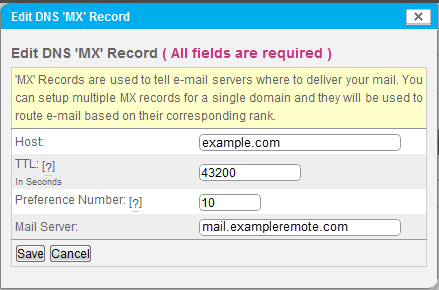
- Enter the appropriate settings for your remote mail server and click Save.
- TTL: Time to Live; the number of seconds that a record will be considered valid by a server caching the information.
- Preference Number: An integer, ranging from 0-65535, indicating the order in which records should be attempted. Lower numbers will be processed before higher numbers.
- Mail Server: The name of the destination server where mail traffic will be directed.
Once you have disabled local delivery and provided custom MX records, Web-based email programs provided by InterWorx will now act as IMAP clients, provided that IMAP is supported by the mail server.