

Show Single Variations
Programatically assign variation visibility
Coming soon: Iconic Show Single Variations is becoming part of Kadence Shop Kit. You may see both names used while we update the product, documentation, and customer experience.
If you’re looking to assign the variaton visibility in your store and don’t want to do it on a per-product basis, you can do so with the code on this page.
WooCommerce stores the visibility in a hidden taxonomy named product_visibility. The possible terms of this taxonomy are:
- exclude-from-catalog
- exclude-from-filtered
- exclude-from-search
- featured
- outofstock
- rated-1
- rated-2
- rated-3
- rated-4
- rated-5
Show Single Variations makes use of only the first 4: exclude-from-catalog, exclude-from-filtered, exclude-from-search, and featured.
You can programatically assign any of these terms with a code snippet like this:
$variation_id = 4053;
$append       = false;
$terms        = array( 'exclude-from-catalog' );
wp_set_object_terms( $variation_id, $terms, 'product_visibility', $append );
Please replace the value of $variation_id with the ID of variation that you want to update.
You would also need to change post meta _visibility. This is used to set the value of these checkboxes:
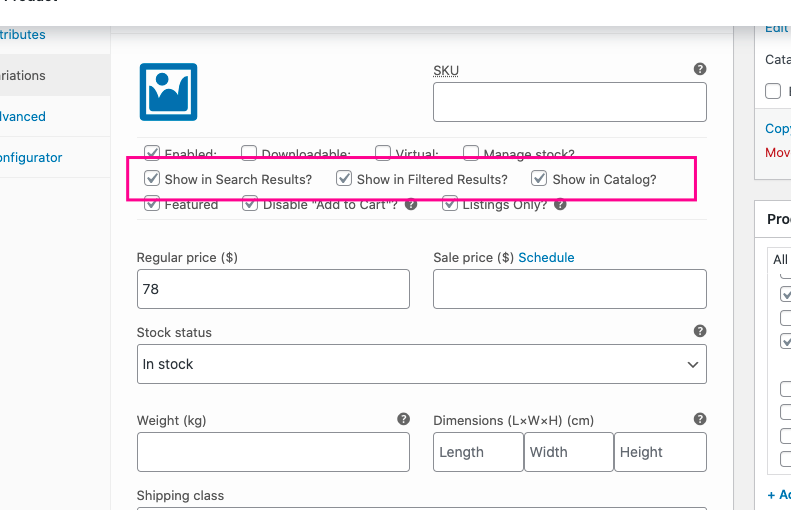
$visibility = array( 'catalog', 'filtered', 'search' );
update_post_meta( $variation_id, '_visibility', $visibility );
Example
To show a variation in catalog, search and filtered results, use this code:
$variation_id = 4053;
$append       = false; // Replace terms, don't append.
$terms        = array();
wp_set_object_terms( $variation_id, $terms, 'product_visibility', $append );

$visibility = array( 'catalog', 'filtered', 'search' );
update_post_meta( $variation_id, '_visibility', $visibility );
To hide a variation from catalog, search and filtered results, use this code:
$variation_id = 4053;
$append       = false; // Replace terms, don't append.
$terms        = array( 'exclude-from-catalog', 'exclude-from-filtered', 'exclude-from-search' );
wp_set_object_terms( $variation_id, $terms, 'product_visibility', $append );

$visibility = array();
update_post_meta( $variation_id, '_visibility', $visibility );