

How to generate CSRs in Siteworx
In order to purchase an SSL Certificate, you must first create a Certificate Signing Request (CSR) within SiteWorx. Follow the steps below:
- Log in to your SiteWorx account.
- If you do not know your password, click Forgot your password on the login page.
- From the SiteWorx main menu, click Hosting Features > Domains > SSL.
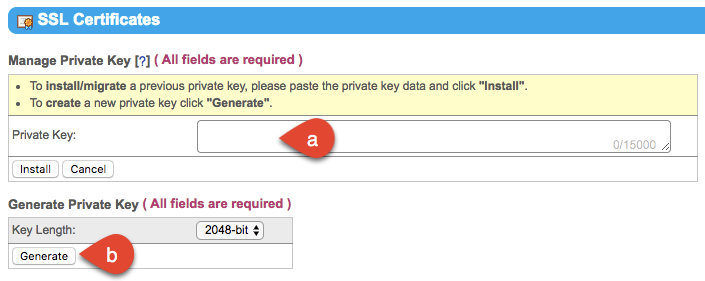
- Set up the private key: Click Setup Private Key.
- If you have an existing private key, copy and paste it into the corresponding field, then click Install.
- If you do not have a private key, click Generate.
- Click Setup CSR.
- In the Manage CSR section, enter your personal information, then click Generate
- To view your newly created CSR, click View CSR.
- Your CSR will appear. When copying the CSR for other purposes, such as SSL certificates, include the phrases –—-BEGIN CERTIFICATE REQUEST—– and —–END CERTIFICATE REQUEST—-