

Delivery Slots
How To Set Up Delivery/collection Days
Coming soon: Iconic Delivery Slots is becoming part of Kadence Shop Kit. You may see both names used while we update the product, documentation, and customer experience.
No matter if you want to offer delivery or collection for your customers, setting up your delivery/collection days can be done by taking the following steps:
Note: If you’d like a more in-depth guide on offering collection/local pickup for your customers follow this guide instead.
- From your WordPress dashboard, go to WooCommerce > Delivery Slots and click the Date Settings tab.
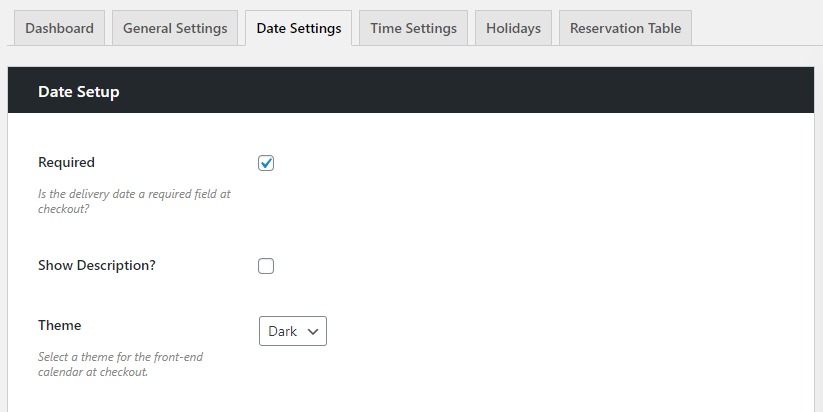
- Make sure the Required checkbox is ticked in the Date Setup section. This will require customers to select a delivery/collection date at checkout.
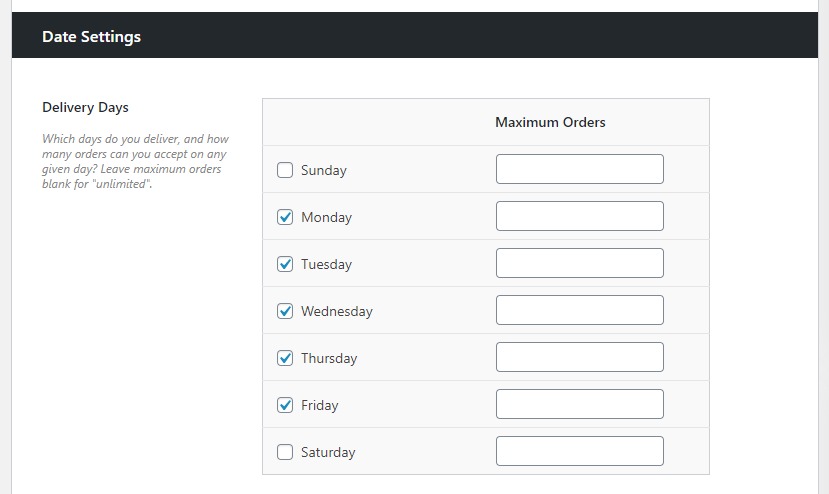
- Once done, scroll down to the Date Settings section where you’ll be able to select which days you want to offer delivery or collection (Delivery Days).
- Again, if you want to set this up for collection, please see our managing collection guide for more details.
- Again, if you want to set this up for collection, please see our managing collection guide for more details.
- Click the checkboxes next to each day you’d like to offer delivery/collection and once happy, scroll down to the bottom of the page and click the blue Save Changes button.
Filed under
Uncategorized
Was this page helpful?
Thanks for the feedback!