

How to configure SiteWorx email autoresponders
Overview
Autoresponders are a SiteWorx feature allows the configuration of automated replies to mail sent to your domain email accounts. Upon creation, autoresponders remain active until deleted.
SiteWorx also provides a feature that allows you to set up an automatic reply for a specific email box on your domain. Unlike Autoresponders, this type of automatic reply can be enabled/disabled as needed.
But first…
These procedures require access to your SiteWorx account.
- If you do not know your password, click Forgot your password on the login page.
Creating autoresponders
Autoresponders remain active until deleted.
- From the SiteWorx main menu, click Hosting Features > Email > Autoresponders.
- In the Email Address field, type the name for your autoresponder.
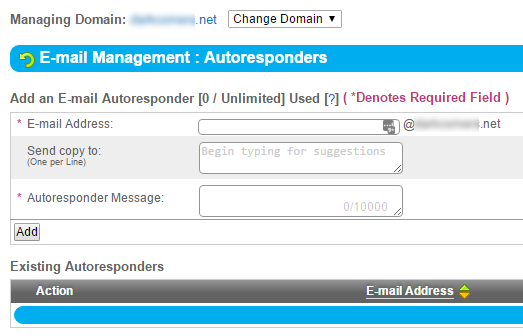
- In the Autoresponder Message field, type your message (see above).
- Click Add (see above).
Modifying auto-responders
- From the SiteWorx main menu, click Hosting Features > Email > Autoresponders.
- In the Existing Autoresponders section, locate the desired autoresponder and click Edit.
- Make your desired changes, then click Save.
Deleting autoresponders
- From the SiteWorx main menu, click Hosting Features > Email > Autoresponders.
- Next to the autoresponder that you want to delete, click Delete.
- When prompted for confirmation, click Delete.