

Past Due Invoice
Overview
We understand that payments can sometimes be missed. If you have a past due invoice, it’s important to resolve it quickly to ensure your services continue running smoothly. We make this process simple. This guide will show you exactly how to view any outstanding balance and make a payment directly through the Billing Center, available in your portal.nexcess.com portal.
Account Suspension
Important: 14-day Suspension Policy for Past Due Accounts
Your account will be suspended if we do not receive a payment within 14 days of the past due notice.
If an invoice remains past due, your account may be suspended. If your account has been suspended, a case will automatically be sent to the email address we have on file, notifying you of the account suspension. During a suspension, your access will be limited to the Billing Center, and your services and servers are temporarily taken offline. This means your websites and applications will not be accessible.
The fastest way to resolve this is to pay the outstanding balance in full. Once your payment is successfully processed, our system will automatically restore your services, getting you back online.
Account Termination
Important: 28-Day Termination Policy for Past Due Accounts
If an invoice remains unpaid for 28 days, our system automatically terminates the account and permanently deletes all server data.
To prevent any unexpected service interruptions, it’s important to be aware of our 28-day past due policy. If an invoice remains unpaid for 28 days, your account is scheduled for termination. This is a final, automated action that permanently deletes your server and all associated data, including backups. This data cannot be recovered once the termination is complete. To avoid this and ensure your data is safe, please make sure to pay your outstanding balance in full before this 28-day period ends.
Avoid Past Due Invoices by Enabling Auto-Pay!
By adding a valid payment method, you gain the convenience of Autopay and eliminate the risk of suspension due to non-payment.
Suspension with Auto-Pay
If a payment fails, we’ll attempt to charge your card every Monday until we suspend your account 14 days past due.
Examples
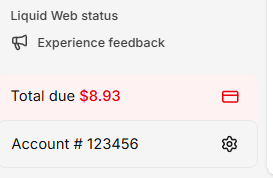
A red balance total will appear at the bottom left hand navigation while visiting portal.nexcess.com with a Make a payment button.
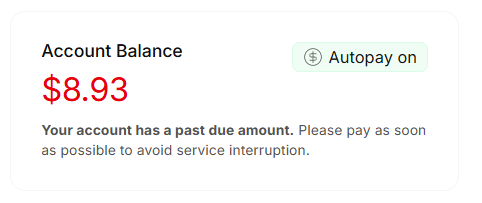
Your balance will also display on the portal.nexcess.com home page.
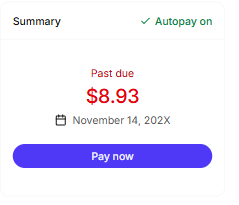
A third warning will also appear in the Billing Center. along with a Pay now button.
Make a Payment
Looking to make a one time payment? Follow these instructions to pay your balance. Need to update your card, or payment method? Find out how in our article Change Your Payment Information.