

Solid Security
Vulnerability Protection with Kadence Security
Coming soon: Solid Security is becoming Kadence Security. You may see both names used while we update the product, documentation, and customer experience.
Kadence Security Pro’s (formerly Solid Security Pro) Vulnerabilities feature identifies and manages security vulnerabilities within your WordPress system and plugins.
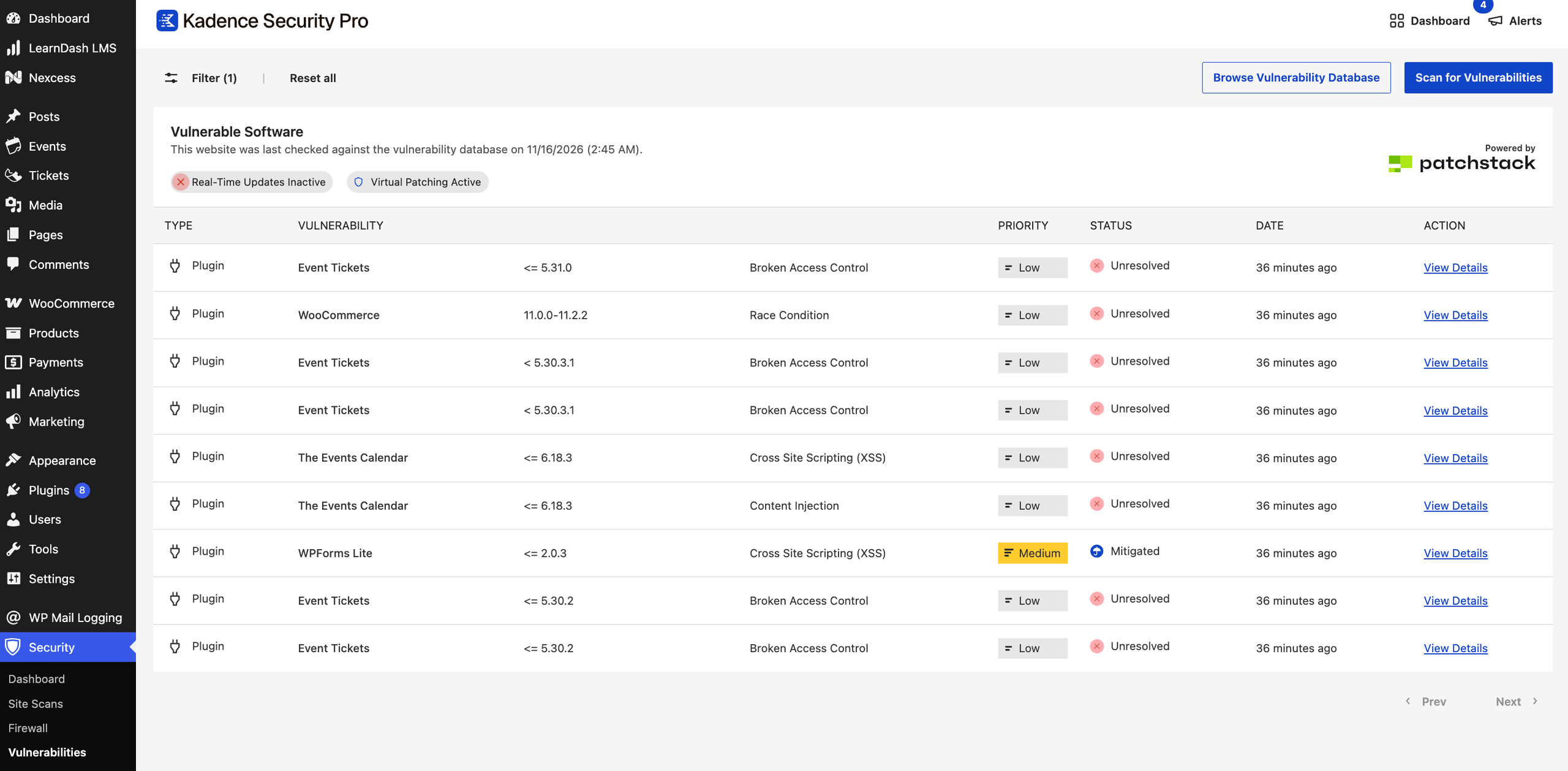
Scanning and Assessment
Vulnerability Scan monitors websites regularly to identify potential vulnerabilities in WordPress installations or plugins. These can include outdated software, misconfigurations, and known security weaknesses.
Manual and scheduled site scans are covered in All about Kadence Security Site Scans. Scheduled scanning is enabled under Security → Settings → Features → Site Check → Scheduled Site Scan. See also Kadence Security Features Settings.
Vulnerability Database
Kadence Security Pro leverages the Patchstack vulnerability database to cross-reference findings and provide accurate assessments.
The vulnerability database is a valuable resource because it provides centralized information on vulnerabilities, making critical data easily accessible. Regular updates ensure users are informed about emerging threats as they arise. At the same time, each entry typically includes the Patchstack Priority score, which helps determine the real-world risk to your site, affected software versions, and potential impacts, helping Kadence Security Pro assess its risk.
Severity Prioritization
Kadence Security helps you assess and manage vulnerabilities based on their potential impact and likelihood of exploitation. By categorizing vulnerabilities into risk levels, Kadence Security Pro users can prioritize which issues to address first, ensuring that critical vulnerabilities are patched promptly while guiding less urgent risks.
Kadence Security Pro utilizes the Patchstack Priority vulnerability scoring system to provide a more accurate representation of the seriousness of security vulnerabilities. This system classifies vulnerabilities into three categories (High, Medium, and Low), allowing users to focus on where it’s needed first and reduce noise from vulnerabilities that are not an imminent threat.
High Priority:
- Expected to become actively exploited
- Known to be actively exploited already
- Receives a virtual patching rule from Patchstack
- Recommended time to patch/update: 0 days
Medium Priority:
- Could be exploited in more targeted attacks
- Is not publicly known to be exploited
- Receives a virtual patching rule from Patchstack
- Recommended time to patch/update: 7 days
Low Priority:
- Recommended patch/update interval: 30 days.
- Not expected to become exploited
- Not known to be exploited
- Does not require a virtual patching rule from Patchstack
Reporting and Alerts
The feature generates detailed reports outlining vulnerabilities, risk levels, and recommended remediation steps. Alerts can be set up to notify relevant personnel of critical vulnerabilities.
Site Scan Results and related emails are managed under Security → Settings → Notifications. For vulnerabilities, emails focus on issues that meet the Vulnerability Notification Threshold in the Scheduled Site Scan settings and were not already reported in the previous scan. See Kadence Security Global Settings and Notifications.
If the site is connected to Kadence Central, vulnerability visibility may also appear in the Central Vulnerabilities view after the site completes its scan. See Vulnerabilities in Kadence Central.
Remediation Guidance and Solutions
In addition to identifying vulnerabilities, the feature typically provides actionable remediation strategies to help organizations address them effectively.
When a solution is available, Kadence Security Pro will prompt you to update the plugin to implement the fix for the vulnerability.
If no solution is available, it may prompt you to deactivate the plugin until one is.
If neither option suits you, you can always mute notifications, which will prevent Vulnerability reports from notifying you about vulnerabilities in the future. Just know that leaving a vulnerability active on your site can put your website at risk.
Muting Site Scan issues is also covered in All about Kadence Security Site Scans.
Integration
It can often integrate with other security tools and platforms, enhancing overall security posture and facilitating better incident response. Kadence Security works to strengthen the website, but it does not offer malware protection through malware scanning. There is no perfect security solution, and it’s often recommended to pair Kadence Security Pro with a malware-scanning plugin to achieve optimal security on your websites.
Virtual patching and firewall automation are covered in All about Firewall with Kadence Security. Version Management can auto-update when a fix is available and connects with vulnerability intelligence under Security → Settings → Features → Site Check. See Kadence Security Features Settings.
Overall, Kadence Security Pro’s vulnerability feature helps you proactively identify and manage security risks, improving your website’s cybersecurity.
Virtual Patching shows as Inactive
This is usually caused by Patchstack not being licensed. Resolve it from WordPress Admin:
- Go to Settings → SolidWP Licensing and confirm the Patchstack Enabled section shows this site as licensed with Patchstack.
- If your plan is managed through Liquid Web Software Portal, also check Settings → Nexcess Licensing and refresh or activate Kadence Security Pro so Patchstack entitlements can apply.
For full licensing steps (unified vs legacy SolidWP/iThemes), see SolidWP Licensing: How to Make sure your site is licensed correctly.
On the Firewall screen, Real-Time Updates may show as Inactive until Version Management is enabled and Patchstack licensing is valid. Enable Version Management under Security → Settings → Features → Site Check, then refresh Security → Firewall.