

The Events Calendar
Configuring The Events Calendar With Constants
Every time WordPress runs, a number of key settings are loaded into memory, such as details about how to connect to the database. These settings are generally defined as constants within the wp-config.php file and it’s entirely possible to change or add to them in order to tweak WordPress and modify its behavior slightly.
If you are reading this, it won’t come as much of a surprise to learn that The Events Calendar can also be tweaked simply by defining some new constants within wp-config.php.
This article details each of the five constants that can be used to fine-tune The Events Calendar.
As previously mentioned, some pretty critical information is stored in wp-config.php (database credentials, for instance) so it is imperative that you make a copy of this file before you start editing… just in case.
The constants we will look at are:
TRIBE_HIDE_UPSELLTRIBE_DISABLE_TOOLBAR_ITEMSTRIBE_DISABLE_PUEPUE_UPDATE_URLTRIBE_DISABLE_DEPRECATED_TAGS
Defining constants is straightforward:
define('TRIBE_HIDE_UPSELL', true);
Note that, as is conventional, the name of the constant is all uppercase. Don’t make the mistake of changing this to lowercase or anything else. Here’s an example:
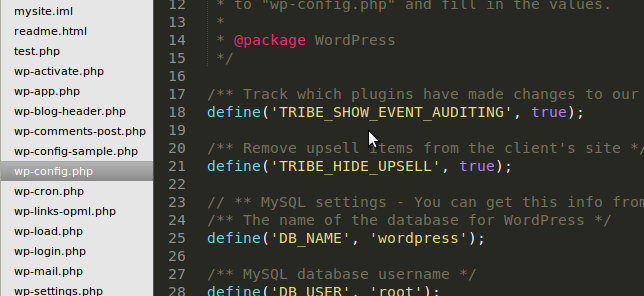
In the screenshot above, the TRIBE_HIDE_UPSELL has been set to true. It’s that easy!
Removing Upsells
Throughout the admin screens for our plugin, you’ll notice links and information about our other plugins that are available as add-ons for The Events Calendar. Using TRIBE_HIDE_UPSELL will remove the admin menu items for these add-ons as well as all the other upsell text used throughout the admin screens for the plugin.
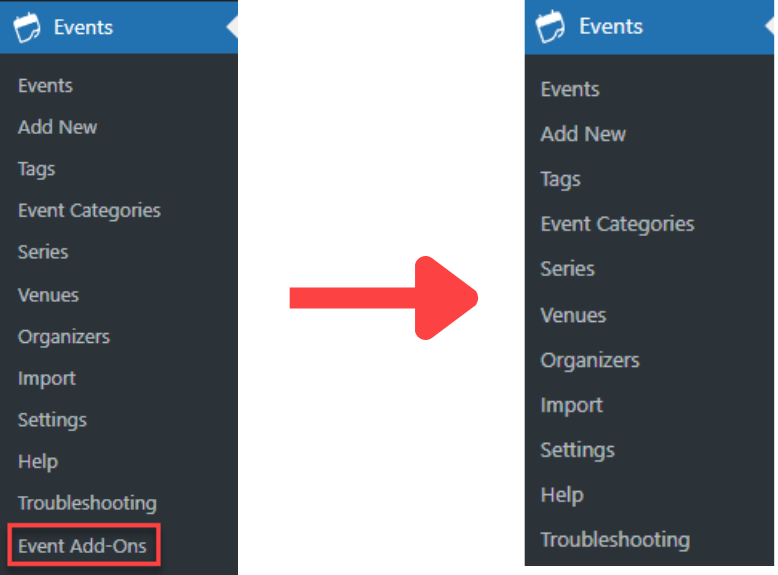
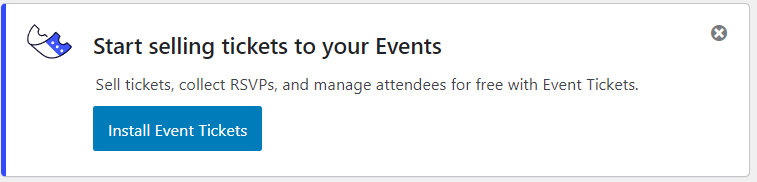
For more information check out our article on Removing the Add-On Upsell and Event Tickets In-App One Click Install Notice.
define('TRIBE_HIDE_UPSELL', true);
Disable Toolbar Items
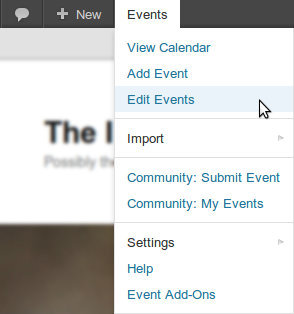
By default, a handy menu is added to the WordPress toolbar allowing rapid access to various event pages and settings. This same menu may also be populated with items by various add-ons (such as Community Events) if you happen to have them installed.
This isn’t always desirable, though: it might be that your toolbar is already crowded with menus added by other plugins or it could just be that you need to keep things as simple as possible for your client.
As you’ve probably guessed, we have also made it possible to disable this by means of defining a constant:
define('TRIBE_DISABLE_TOOLBAR_ITEMS', true);
Disable Automatic Update Notifications
If you would like to prevent The Events Calendar from looking for updates and prompting automatic updates use TRIBE_DISABLE_PUE. Setting this to true will prevent your site from looking for the latest version of The Events Calendar when checking for normal updates to themes or plugins.
define('TRIBE_DISABLE_PUE', true);
PUE Update URL
This constant, PUE_UPDATE_URL is quite simply the URL used to check for updates. Generally speaking, there is no need to change this, however, if we ever moved our update systems to a different domain (which is unlikely) it’s possible that you would need to define this to continue receiving updates.
Prevent Deprecated Functions From Loading
Over time, some functions available within a plugin get replaced with different functionality, or better approaches to the solution are developed. As a consequence, some of these old functions become “Deprecated”. However, since some users may have previously taken advantage of these functions, we don’t want to completely remove them from our plugin. This would be a bad practice when considering backward compatibility since our plugin updates would cause our customer’s sites to break.
However, with deprecated functions, there may be some naming conventions that cause conflicts with your theme or other plugins. This happens when other functions with identical names get defined elsewhere in the active code. To prevent this, use TRIBE_DISABLE_DEPRECATED_TAGS to prevent these functions from loading and preventing them from conflicting with the rest of the code on your site.
define('TRIBE_DISABLE_DEPRECATED_TAGS', true);
We hope this was of value to you. If there’s another constant you think might be worth adding or have questions about any of those outlined above, let us know!