

LearnDash
ProPanel Quiz Reports
You can use ProPanel to review quiz completion, time spent, pass rates, and attempts. Go to ProPanel > Dashboard, click View dashboard, then select Quiz Reports in Report Tools.
View quiz attempts
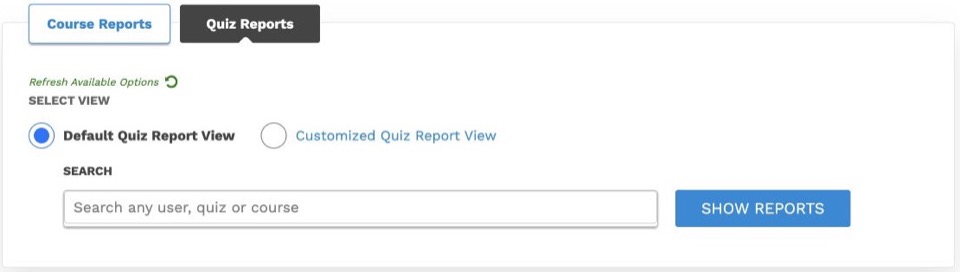
The Quiz Reports block displays tabular data for the selected report view:
- Default Quiz Report View: Lists individual quiz attempts. Search for a learner, quiz, or course, then click Show Reports. The attempt table includes individual download controls and a Bulk Export option.
- Customized Quiz Report View: Groups attempts by course and includes detailed question results. Use course, group, and quiz filters to narrow results. Click Customize Report to select specific fields, then click Apply Filters to generate the layout.
Quiz report controls:
Export quiz results or learner answers
- Generate the required report view, then click Bulk Export.
- Review the course, group, quiz, and date filters in the export window. Click Apply Filters to update the export selection.
- Verify the number of selected attempts.
- Under Export all quiz attempts result or Export quiz attempts learner answers, select CSV or XLSX.
- Once file generation finishes, click Download CSV or Download XLSX.
Report settings and export-window filters operate independently. Always confirm export parameters prior to downloading files.
Quiz Completion Rate
This block displays the percentage of learners who have completed all quizzes within each course. Select a course to view completed versus incomplete statuses in a pie chart.
Quiz Completion Time
This block displays total time spent on quizzes per course. Apply a course filter to inspect time spent by individual learners.
Learner Pass/Fail Rate
This block displays the percentage of learners who passed all quizzes within each course. Select a course to view its pass/fail breakdown in a pie chart.
Average Quiz Attempts
Select a course to view attempt counts and average attempt metrics across learners, accompanied by a chart comparing attempts per quiz.
Learners viewing their own results
Learners can review their own attempts and answers using the Student Quiz Results page. See Student Quiz Results in ProPanel for setup and usage steps.