

LearnDash
ProPanel Time Tracking and Performance
You can use ProPanel’s time tracking settings to exclude idle time from learner reports. Configuring cached reports and database upgrades also improves report load times.
Configure idle tracking
Go to ProPanel > Settings > Time Tracking Settings. Idle tracking uses mouse movements and keyboard input to determine learner inactivity. Time spent on alternative browser tabs is also excluded from active learning duration.
Keep idle tracking enabled to exclude inactive periods from time reports. Disabling this setting impacts report accuracy.
Configure these fields:
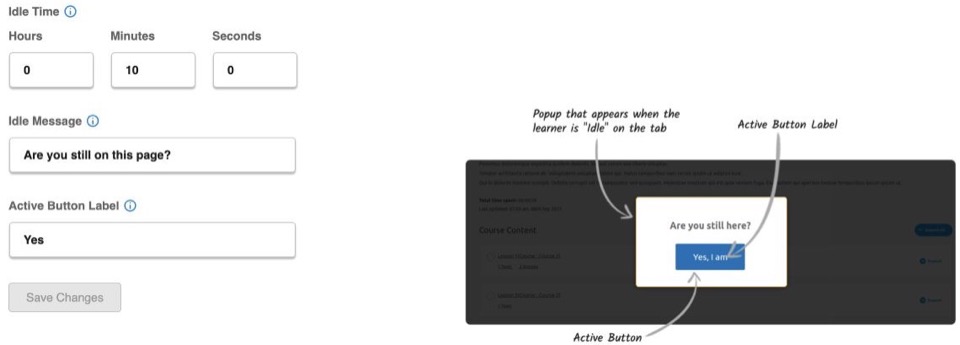
- Idle Time: Set the hours, minutes, and seconds of inactivity required before the idle prompt displays.
- Idle Message: Enter the prompt message displayed to inactive learners.
- Active Button Label: Define the button text learners click to resume time tracking.
Click Save Changes to apply time tracking configurations. The Idle Time Configuration Log records the ten most recent activation and deactivation log entries. Tracking functions while the setting remains active and does not retroactively calculate idle time prior to enablement.
Idle tracking controls:
Read the Time Spent on a Course report
This block compares total time spent by learners across courses. Combine course and learner views with category, group, course, and completion-status filters to refine charts. Display total durations in minutes, hours, or days.
Run data upgrades
ProPanel includes Course Users Data and Group Users Data maintenance routines to optimize loading performance:
- Navigate to ProPanel > Settings > Data Upgrades and select the required upgrade routine.
- Click Upgrade Data.
- Allow the progress indicator to reach 100%, then click Continue.
Refresh a cached report
Select report blocks cache output data to minimize load time. Check the data generation timestamp on the report and click the reload icon whenever updated data is required.
Initial report generation may take longer when processing large datasets. If a report displays a loading error, refresh the page view and retry.
Server resources
Report rendering speeds depend on total dataset size, report complexity, and allocated server resources, including system RAM and the configured PHP memory limit.